Saturday, August 3, 2019

Friday, August 2, 2019
Q. What's the best way to back up my data?
I have a PC running Windows XP, and currently back up my data regularly using copy and paste onto an external hard drive. The problem with my current drive‑to‑drive method is that, in the case of a full windows reinstall, it means that I still have to reinstall some software (and this eats into my downloads and licences from the developers' web site). Is specialised disk cloning or imaging software a better option?
Paul Allerton, via email
SOS contibutor Martin Walker replies:
You're very wise to back up your data regularly, but there's a fundamental difference between copy and paste backups and disk imaging or cloning: the latter takes a snapshot of everything on the chosen partition or drive, including all the hidden and system files, although it's clever enough to ignore such things as huge page files that only contain temporary data, to keep the image file sizes to a minimum.
Each image file is, therefore, a time capsule, since when you 'restore' it your computer will return to exactly the same state it was in when you created that image file, leaving your licensed software intact. Most imaging utilities also offer compression options, typically squashing the data to about half the original size, while still letting you explore and restore individual files contained within.
It's always safest to store these image files onto external media, such as DVD or an external hard drive, to cope with the worst‑case scenario of your entire computer blowing up or being struck by lightning. In which case, when you get your replacement PC, you can restore your external backups onto this and avoid days of reinstalling Windows and applications, and authorising copy‑protected software. However, if, like many musicians, you have several hard drives in your audio PC, you can also store routine images of one drive to another, so that if one drive goes belly‑up, you'll still have a recent image file on your other drive to restore when you've replaced the faulty one.
We explored different strategies for backing up your data in the October 2007 issue of Sound On Sound (see /sos/oct07/articles/data_protection.htm), and it might be worth giving that a read for more information.
There's a bewildering array of imaging utilities on offer, so here's a quick rundown of some of the best alternatives. Windows 7 now includes its own Backup & Restore application that many users find perfectly sufficient, and for Windows 7/XP/Vista a very popular commercial package is Acronis True Image, especially since free licensed versions are available from various hard-drive manufacturers, for use with their own products.
 An imaging utility (such as Paragon Backup & Recovery, shown here) will create a complete snapshot of your computer's hard drive and save you having to reinstall software after a crash or drive failure.
This free version of Paragon Backup & Recovery 2010 runs on both 32‑bit and 64‑bit versions of Windows 7, Vista, XP and Server 2003/2008. It can create a Linux/DOS recovery environment onto CD, DVD or Flash memory (so that you can boot your PC from these media and restore image files even if your computer refuses to boot up by itself). You can even assign a drive letter to 'mount' an archived partition, so you can access the files within using Windows Explorer. More sophisticated versions are available, but to date I've been perfectly happy with the free one.
Published December 2010
Thursday, August 1, 2019
Wednesday, July 31, 2019
Q. How do you increase perceived stereo width using phase?
I found an SOS article on stereo mixing from October 2000 on your web site which explains how you can increase perceived stereo width by using extra mixer channels out of phase. However, the diagram is missing. Can you explain how it's done?
SOS Forum post

First, you need to set up your mixer so that both the left and right stereo signals feed two mixer channels each. You can either do this using a couple of 'Y' leads to split the signals, or by using channel insert sends to feed the secondary left and right channels (as shown in the diagram). Ideally, the mixer should have channel phase-reverse buttons, though if you have balanced line inputs and no phase buttons, you can instead reverse the phase by switching the hot and cold cores on your 'Y' cables so that one of the left inputs and one of the right inputs is reversed.
To set up the effect, pan the main left input hard left and the main right input hard right as normal. Next, pan the secondary left input hard right, but switch in phase invert on its mixer channel or swap the hot and cold cores. Similarly, take the other right input, pan it hard left and invert its phase. In the diagram, the secondary, out of phase left and right channels are placed on opposite sides to the main left and right channels, so that, from left to right, the channels are R2, L, R and L2.
Start with the faders down on the two out-of-phase, 'wrong-side' panned signals and then gradually bring them up to add stereo width. If you go too far, you'll notice the centre signals becoming weaker and a hole appearing in the centre of the stereo field, so don't overdo it.
Published November 2003
Tuesday, July 30, 2019
Monday, July 29, 2019
Q. What's a good Leslie speaker effect?
I'm looking for a decent stand-alone Leslie-style rotary speaker effect, mainly for use with keyboards, but also for guitars. Can you offer any suggestions?
Michael Reed
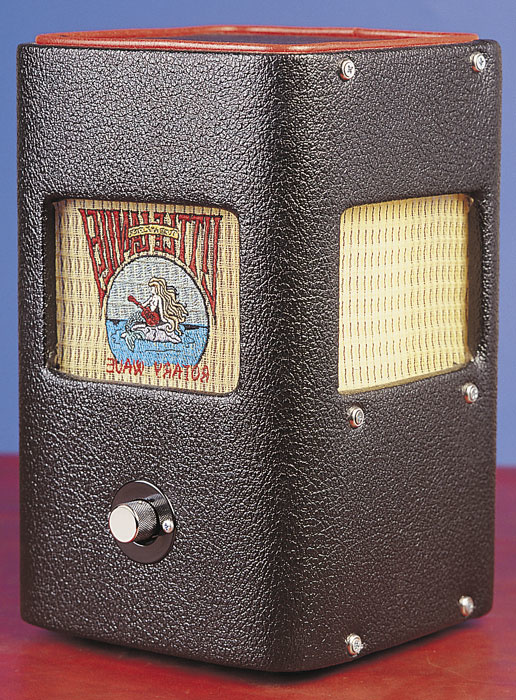 The Little Lanelei is a miniature, single-cone rotary speaker designed for recording.
Dunlop (www.jimdunlop.com) produce a couple of rotary effects. The Rotovibe pedal is mainly intended for guitarists who are after a Jimi Hendrix-style Leslie effect. It looks like a wah-wah pedal, with a single knob on the side to alter modulation depth while the expression pedal controls mod speed, a useful feature for live performance. Dunlop's UV1 Uni-Vibe offers a broader range of sounds, featuring tremolo and chorus modes with adjustable speed, volume and intensity. The optional UV1FC foot controller allows remote control of mod speed and bypass switching.
Dunlop's Uni-Vibe takes its name from the original Uni-Vibe produced by Roger Mayer, an effect used extensively by Hendrix, Robin Trower and many others. The original model is no longer in production, but Roger Mayer (www.roger-mayer.co.uk) produce an updated version, called the Voodoo-Vibe. This Class-A, all-analogue guitar effect features chorus, vibrato and tremolo modes and controls for modulation speed and range (there are three sine-wave and three triangle-wave speed ranges), intensity, symmetry and bias. It also supports an external speed control pedal. Though its earliest ancestor was originally developed as a rotary effect for the organ, the Voodoo-Vibe can produce a range of experimental and psychedelic effects that stretch far beyond Leslie emulation. You might even be able to get away with using it on vocals as well as guitars and keys.
 A rear view of the Leslie 122XB cabinet, with panels removed to reveal the treble horns (top) and foam bass rotor (bottom) responsible for the distinctive Leslie sound.
Another such effect is the Spin II from Italian organ manufacturers Voce (www.voceinc.com). This stompbox, coloured an eye-catching orange, is a stand-alone implementation of the rotary simulator from Voce's keyboards. The input can be switched to suit guitar or line-level sources and the stereo output can be turned down to feed a guitar amp. There are bypass and fast/slow footswitches and controls for the fast and slow rotor rates and rotor acceleration.
If none of these pedals will really give you the sound you need, and you've plenty of room to spare in your studio, perhaps you should consider buying a second-hand Leslie cab — I saw a solid-state Leslie 760 advertised for £150 recently, which is less than the list price of some of the effects I've mentioned above. Be aware, though, that Leslies of different vintages use completely different connection and power standards, so even if you have a Hammond organ, or a modern Hammond-modelling keyboard with a Leslie output (like Roland's VK8), it's not the case that any old Leslie will do. If you can get hold of a Leslie Combo Preamp (and I wish you luck), you'll be able to put just about anything through a Leslie cab. This handy chrome wedge-shaped pedal features bypass, fast/slow and breaker switches, provides power to the Leslie's motors and offers a quarter-inch jack input. Once again though, you'll need to match the right model of Leslie Combo Preamp with the right model of Leslie cabinet. Trek II Products in the USA (www.trekii.com) produce a modern equivalent. There's a wealth of information on Leslie maintenance, modification, and compatibility at web sites like www.theatreorgans.com and www.dairiki.com/hammondwiki where you'll find links to many other places of interest on the Net.
A final option to consider is the Little Lanilei Rotary Wave speaker (www.songworks.com). This stylish rotary speaker, available in 65W/10-inch and 35W/6.5-inch versions, features a single rotor and a speed control. While you couldn't expect it to reproduce the sound of a Leslie at full blast, it's also much smaller and lighter, and you can plug an external amplifier into it via quarter-inch jack, making it an easy way to add a subtle rotary effect to guitars, keyboards, vocals and just about anything else.
Published November 2003
Saturday, July 27, 2019
Subscribe to:
Posts (Atom)