Welcome to No Limit Sound Productions

Company Founded
2005
Overview

Our services include Sound Engineering, Audio Post-Production, System Upgrades and Equipment Consulting.
Mission
Our mission is to provide excellent quality and service to our customers. We do customized service.

Monday, September 9, 2019

Q. What's the difference beween morphing and crossfading?

By Len Sasso
Is there any real difference between morphing from one sound to another and crossfading? In many cases, the two sound very similar.
Anna Silman
SOS Contributor Len Sasso replies: Morphing and crossfading are really two entirely different processes and apply to different situations. Crossfading takes place between two audio files, typically non-destructively in a sequencing environment or destructively in a sample editor. The effect, of course, is that one sound fades out as the other fades in.
Crossfading between two different sounds.Crossfading between two different sounds.

Morphing takes place between two groups of settings for an audio device, either hardware or software. In that case, one sound also dissolves into another, but the intermediate sounds are not simply a mix of the starting and ending sounds.

If you have sequencing software and a synth plug-in that can be automated, here's an experiment to quickly convince yourself that there really is a difference.

Set up a basic oscillator and lowpass-filter patch without any envelope applied to the filter cutoff. Record rather long clips with the filter wide open, then with it relatively closed (but with the oscillator still audible). Now crossfade between the clips over a fairly long period. Next use animation to slowly sweep the filter cutoff across the same range. Compare the crossfade with the animated filter, which amounts to morphing between the open and closed states. Of course, morphing usually involves many more parameters, and the results are correspondingly more complex and interesting.


Friday, September 6, 2019

Q. What's the difference between Detect Silence and Hitpoints in Cubase?

By Len Sasso
The Hitpoints mode in Cubase SX is designed to detect and mark individual hits, making beat-slicing easier.The Hitpoints mode in Cubase SX is designed to detect and mark individual hits, making beat-slicing easier.
Cubase SX has a Detect Silence feature and a Hitpoints feature that seem to me like they do pretty much the same thing. Are they different, and when should I use them?

Ben Flanagan

SOS Contributor Len Sasso replies: Yes, those features are really quite different. Silence-detection software, of which SX's Detect Silence is an example, works by searching for areas in an audio file where the level drops below a given threshold for a specified minimum amount of time. Beat-slicing software, of which Hitpoints is an example, works by searching for abrupt changes in an audio file, presumably signalling individual events such as drum hits in a percussion file.

As the names imply, one of the main differences between Detect Silence and Hitpoints is that Detect Silence marks and optionally removes whole sections that it interprets as 'silence' (threshold, duration and other criteria are typically user-definable), while Hitpoints marks individual points in the audio file, the theory being that the region between two points represents a single event.

In a simple audio file, say a kick-drum part, Detect Silence could be used to separate the individual kicks, but in a busy percussion part, it's unlikely that individual events are separated by silence. Detect Silence would be no help in that case. On the other hand, Hitpoints would be little help picking out regions separated by silence in an audio file (such as a track from an audio sampling CD) because each region would most likely contain a large number of hitpoint markers, but none at the boundaries of the silent portions. In short, use Hitpoints for slicing up audio files into individual events and use Detect Silence for identifying (and possibly removing) low-level regions in an audio file.


Wednesday, September 4, 2019

Q. What does diatonic mean?

By Len Sasso
I know that the white keys on a keyboard form a diatonic scale, but what does diatonic really mean?

Rob Fowler
Finger on piano keyboard.

SOS Contributor Len Sasso replies: To understand the meaning of diatonic, it helps to think of a scale not as a collection of notes, but rather as a series of intervals.

The definition of a diatonic scale is that there are five whole-tone and two semitone intervals in the series and that the semitones must always be separated by at least two whole-tones.

Using '2' to symbolize the whole-tone steps and '1' for the semitone steps, the major diatonic scale corresponds to the interval series 2212221. No matter what note you start on, following this prescription yields a major diatonic scale — the white keys starting on C is one example. It turns out that all possible diatonic scales are constructed by starting somewhere in the major diatonic scale and continuing until you reach the same note you started on. Those are generally referred to as the church modes: Dorian for 2122212, Phrygian for 1222122, Lydian for 2221221, and so on.

While the preceding definition is correct and functionally useful, it might leave you a little cold, as it does nothing to explain why those intervals are used or why the seven notes in a diatonic scale are chosen over the other notes in the 12-tone equal-tempered scale.

For reasons deriving from the physics and maths of sound, the strongest harmonic relationship aside from the octave is the perfect fifth, which makes G the closest relative of C, for example. Since C stands in the same relationship to F as G does to C, it makes sense that a scale centered around C should contain both G (called the dominant) and F (called the subdominant). The next closest harmonic interval is the major third. Together, the root, major third, and perfect fifth constitute a major triad, and it's not too big a stretch to imagine that you might want to construct a major triad on the three notes C, F, and G. Do that and you have the seven notes in the C diatonic scale.

There's still the question of why there are five other notes in the 12-tone equal-tempered scale, and the answer contains a hidden but important compromise. You can make music, which is naturally called diatonic music, with just the seven notes of the diatonic scale. And if you did that, they would in fact be slightly different notes from the ones you find in the equal-tempered scale. If you want to expand the system to accommodate diatonic scales in other keys, one natural way is to iterate the process of adding perfect fifths. This produces what is commonly called the 'cycle of fifths', but is actually a spiral of fifths that never really comes full circle. But if you make the perfect fifths just slightly flat, they do come full circle after 12 steps. Miraculously, you also wind up with notes that are close to the major thirds — they're a little sharp and a little more out of tune than the fifths, but still usable.

This compromise gives us the 12-tone equal-tempered scale (equal-tempered meaning all the intervals are the same). Relative to C, the extra five notes turn out to be where you find the black keys on the piano keyboard, and that's why the intervalic definition we started with works.


Published September 2003

Monday, September 2, 2019

Q. Can I use three different soundcards at the same time?

By Martin Walker
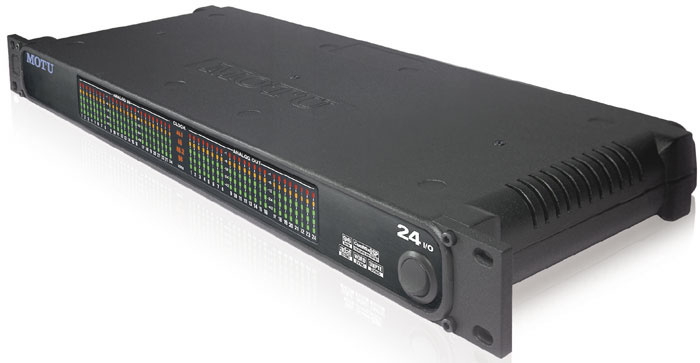
MOTU's 24I/O interface provides 24 simultaneous inputs and outputs from a single PCI card.MOTU's 24I/O interface provides 24 simultaneous inputs and outputs from a single PCI card.
I use a large analogue Soundtracs desk with wonderful EQ, coupled to various bits of outboard gear. I want to output my audio from my PC into the desk for processing. Using all three of my soundcards simultaneously will give me 24 balanced outs. However, these soundcards are different models from different manufacturers. Is there a workaround or do I need three identical cards?

David Fleming

PC music specialist Martin Walker replies: The answer all depends on which MIDI + Audio application you want to run, and which type of soundcard drivers it uses. Although Steinberg's Cubase can run with multiple soundcards from different manufacturers, it can only do so on the PC when running its ASIO Multimedia or ASIO DirectX drivers, neither of which provide low latency. Only true ASIO drivers on either Mac or PC will give you the responsiveness of latencies lower than about 20ms, but unfortunately you can only choose a single ASIO driver from within Cubase, so you could only use one of the three cards at a time.

If, on the other hand, you're using Cakewalk Sonar on the PC, you'll probably be taking advantage of its support for WDM drivers, which can be run in tandem across multiple soundcards of differing makes and models, as well as providing fairly low latency. In most cases you'll be able to run several different soundcards side by side without problems, although there are no guarantees, and some rare combinations may suffer from audio clicks and pops, or cause your computer to crash occasionally or even refuse to boot up at all.

However, if your cards are different, and even if you do manage to run them all simultaneously from a suitable application, you will have to lock their timing together externally. Most 8-in/8-out cards offer S/PDIF I/O, and sometimes word clock, and either of these can be used for sync. Designate one card as Master (therefore running from its Internal clock signal), wire its S/PDIF or word clock output to the S/PDIF or Word clock input of the second card and set the second to expect an external clock. Make the same connection between the second and third cards, with the third also relying on external sync.
If you don't do this, the three cards will 'freewheel', and while they may start in perfect sync they will gradually drift apart during the course of a song, giving rise to possible flanging between tracks running on the different cards, and eventually (on long songs) more obvious inter-track timing problems.

Some manufacturers write soundcard drivers that support multiple cards of the same family, and which can also be internally synchronised to sample accuracy using proprietary sync cables. This is by far the easiest way to approach your problem, since with three identical soundcards of this type you simply end up with an assembly that acts as one huge soundcard with 24 ins and outs, but which appears to ASIO audio applications as one device that can therefore be used with Cubase.

Personally, if I owned a large Soundtracs mixing desk I'd find out which of the three existing cards has drivers that support expansion, and then buy two more cards of the same type — this is the only real way to get professional results when transferring 24 simultaneous tracks from a computer. Alternatively, MOTU's 24I/O interface provides 24 ins and outs from a single PCI card. You could also combine a 24-channel digital audio card with external D-A converters.


Published June 2004