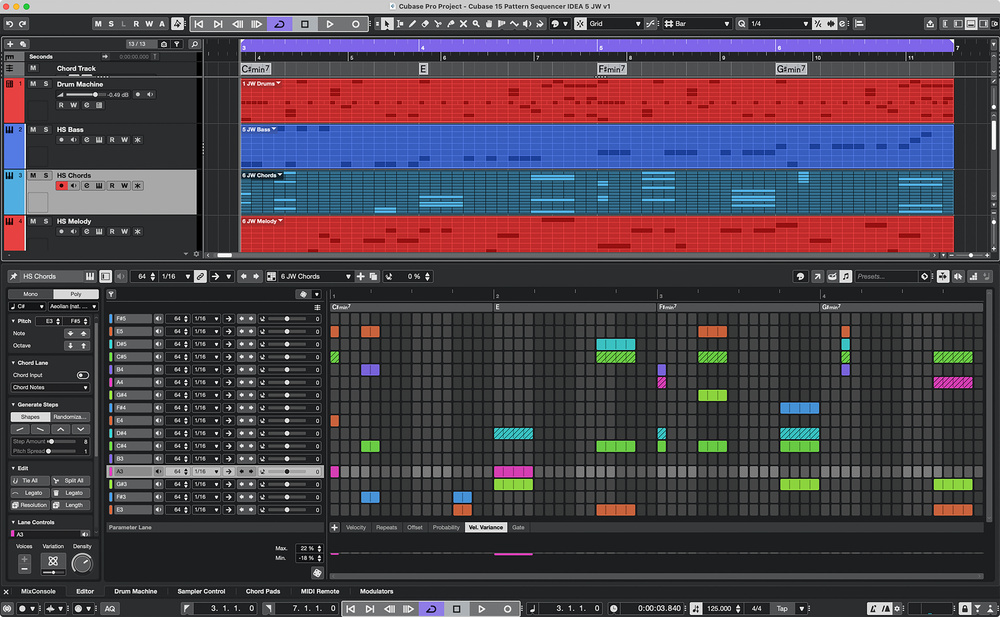
 The Pattern Editor now has a dedicated Melodic mode with both Mono and Poly step‑sequencing options and a Chord Lane.
Cubase’s new synth sounds and Pattern Sequencer features are great on their own — but together they’re even better!
Steinberg introduced the Pattern Editor for Pro and Artist users in Cubase 14. While obviously pairing well with the (also new in 14) Drum Machine track/instrument type, as we explored in the SOS May 2025 workshop, you could also use Pattern Editor for melodic applications. But in Cubase 15, Steinberg took the Pattern Editor concept further. It now offers two distinct modes: Drum and Melodic.
The latter is new, and adds some very useful additional options to those I explored in the May 2025 article. So, let’s get into ‘writing mode’ and explore it, along with the new HALion/HALion Sonic Writing Room Synths expansion (also available in Artist and Pro).
To do that, I’ll target some analogue synth‑style sequenced bass, chord and melody ideas. And to help give you an idea of what I’m writing about, I’ve put an audio example on the SOS website (http://sosm.ag/cubase-0626).
Something Old, Something New
If you select the Pattern Event option when creating a new virtual instrument track, the Lower Zone automatically opens and offers a choice between the Drum or Melodic mode within the Pattern Editor. Both of these modes share many of the core features described for the earlier iteration of the Pattern Editor, providing a lane‑based sequencer grid with customisable step numbers (up to 128 steps), per‑lane and per‑step sequencing of parameters such as velocity, velocity variance and playback probability, and the option to add additional controller lanes related to parameters within the selected virtual instrument.
As I described in the SOS May 2025 workshop, patterns can be created manually on the grid in the usual way, but you also get a selection of tools for automatically populating the whole pattern, or a lane within the pattern — either in a completely controlled way, or harnessing a user‑specified degree of randomisation. It’s cool, creative, and can easily be used to nudge a new idea into being. All this core functionality remains but, as in the main screenshot, Cubase 15’s new Melodic mode has additional elements that directly support this use case; I’ll focus on those below.
Melody Maker
When you opt for Melodic mode, many familiar elements appear in the Lower Zone’s Pattern Editor, but there are some new and revised options to suit the melodic context. A similar grid‑based pattern editing panel dominates the display, but it’s now a conventional pitch‑based grid for your melodic instrument, rather than lanes corresponding to individual drums. You can adjust the step count and resolution as before, but when creating notes these can span multiple...

No comments:
Post a Comment