Welcome to No Limit Sound Productions

Company Founded
2005
Overview

Our services include Sound Engineering, Audio Post-Production, System Upgrades and Equipment Consulting.
Mission
Our mission is to provide excellent quality and service to our customers. We do customized service.

Monday, February 2, 2015

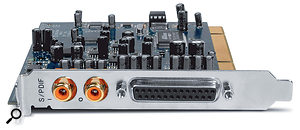
Q. Is the quality of S/PDIF connections on soundcards variable?

Is there any difference between the quality of S/PDIF connections on low-end and high-end soundcards, or am I right in thinking that a low-end card with S/PDIF I/O (and the ability to clock from the A-D converter) should be adequate?


Via SOS web site

If a soundcard is well made, its S/PDIF interface should be quality independent, so the difference between low-end and high-end cards should be minimal in this respect.

If a soundcard is well made, its S/PDIF interface should be quality independent, so the difference between low-end and high-end cards should be minimal in this respect.If a soundcard is well made, its S/PDIF interface should be quality independent, so the difference between low-end and high-end cards should be minimal in this respect.


SOS Technical Editor Hugh Robjohns replies: In theory, S/PDIF is quality independent, assuming that the physical interface is engineered reasonably in the first place. It is purely about transferring the data — there's no jitter to worry about — so, provided you have decent 75Ω cables of modest length, it should just work. I've had very few problems with S/PDIF interfaces, and the few issues I did find were actually caused by ground loops.


Personally, I prefer AES3 interfaces, because they will cope with longer cables and are always ground-free, transformer-coupled connections (often S/PDIF is as well, but not always). And XLRs are so much more reliable than RCA phono plugs!    

Korg All Access: Cory Henry checks out Korg Kronos X

Q. Can I use two completely different mics in an M/S array?

Sound Advice : Miking


I have a vintage Neumann U87 mic, a GAP Pre73 preamp and also a Zoom H4N recorder (massive contrast, I know). If I want to, can I use these in a Mid/Side setup with the Neumann as the Mid mic and the H4N for the Side? Or should I use the U87 in a figure-of-eight polar pattern for the Side and another mic — my Shure SM7B or Rode M3 — as the Mid? How, then, would I combine the two into a Mid/Side audio file?

Although our reader may never achieve great results using vastly different mics in an M/S setup, it may still be worth him experimenting with his U87 in figure-of-eight mode as a Side mic and his Rode M3 as a Mid mic.

Via SOS web site


SOS Technical Editor Hugh Robjohns replies: Using such radically different mics to form an M/S array is never going to give great results; the stereo imaging will tend to be rather variable and frequency dependent because of their mismatched frequency responses.


However, for experimental purposes I'd suggest using the U87 in figure-of-eight mode for the Side mic and either the SM7 or M3 as the Mid mic. I suspect you'll still find quite a lot of image instability, but it should work well enough to give you a feel for the versatility and practicalities of the M/S mic technique.


All you need to do to create a Mid/Side file is allocate the Mid mic to channel one and the Side mic to channel two, and record as a normal stereo file.


Q. Can I use two completely different mics in an M/S array?Regarding rigging the mics, the normal convention is that the in-phase side (front) of the figure-of-eight mic — the U87, say — faces to the left of the sound stage (as viewed from behind the mic array, looking towards the sound sources).Although our reader may never achieve great results using vastly different mics in an M/S setup, it may still be worth him experimenting with his U87 in figure-of-eight mode as a Side mic and his Rode M3 as a Mid mic.Although our reader may never achieve great results using vastly different mics in an M/S setup, it may still be worth him experimenting with his U87 in figure-of-eight mode as a Side mic and his Rode M3 as a Mid mic.Q. Can I use two completely different mics in an M/S array?


You should also set the preamp channel gains to provide a similar sensitivity for both mics, to optimise the signal-to-noise ratio and make the decoder work properly. The easiest way to do that is to decide how wide you want the sound stage to be — decide where the notional edges of the stereo pickup area are — and then get an assistant to stand at the nominal left-hand edge and make a fairly constant noise, such as humming. Assuming the Mid mic output is already providing an appropriate level (if not, adjust that first), set the gain of the Side mic's preamp to give an approximately equal output level to that provided by the Mid mic's preamp.


Question of the month  

Korg USA Sponsors Guitar Center's Singer-Songwriter 2!

Saturday, January 31, 2015

Q. Should I EQ my drum recordings?

When recording a drum part, do I have to EQ it, or should it be left untreated?


There's no hard-and-fast rule when it comes to treating your drum recordings (or not!). If you get a really good-quality source recording, you may not need to EQ it at all.There's no hard-and-fast rule when it comes to treating your drum recordings (or not!). If you get a really good-quality source recording, you may not need to EQ it at all.


Samuel Am, via email


SOS Reviews Editor Matt Houghton replies: There's no right or wrong answer to this question! As long as the drum sounds right to you when played through your studio monitors, use whatever you need to get the result you want: compression, EQ, Transient Designer or, in the case of a snare drum, perhaps even a tiny bit of distortion.


Back in the days of big-budget studio recordings, many engineers would — if they felt it was needed — EQ and compress drum mics on the mixing console while recording, and then print the results to multi-track tape for mixing. Today, it's easy to capture a clean recording and add EQ or other processing to taste at the mixing stage, using plug-ins. This leaves more options open to you, and avoids you getting stuck with poor EQ and dynamics decisions that don't suit the mix, but it also means that you're putting off decisions, so the whole process can take longer.


If you're new to this, I'd recommend experimenting first with mic choice and placement to get the best sound possible. Then add EQ and/or compression during the mix stage if you feel it's needed for the particular track in question. In the long run, you'll end up with better results if you start working in this way, and eventually your EQ and dynamics decisions will become second nature, at which point it will be easy to make them during recording rather than mixing.

There's no hard-and-fast rule when it comes to treating your drum recordings (or not!). If you get a really good-quality source recording, you may not need to EQ it at all.

Of course, depending on the style of the song, it's also perfectly possible to record a natural-sounding drum part with no processing whatsoever, just relying on mic choice and placement (and a good-sounding drum and room, and a good drummer!) to capture a clean sound.


As for which mics to pick, it really depends on the drum(s) you're using: what you use on a kick or snare close-mic can be very different from what you use for overheads or hand-drums.
   

Pa600 Professional Arranger - Performance by Marco Parisi

Friday, January 30, 2015

Q. How important are microphone self-noise and SPL figures?

Sound Advice : Miking


I am interested in the Shure SM7b mic and have been looking at its specifications, but the Shure web site seems to be missing information for self-noise and maximum SPL levels. I've heard people saying that the SM7 can handle up to 180dB SPL! I'm curious as to whether or not that is true (probably not) and if it is anywhere near that, I'm assuming it's because it's got some kind of -30dB switch on it or something crazy like that. Can you shed any light on this?


You won't find self-noise specifications for the Shure SM7b, as it is a dynamic (moving-coil) microphone. The only self-noise generated is the thermal noise from its own output impedance.You won't find self-noise specifications for the Shure SM7b, as it is a dynamic (moving-coil) microphone. The only self-noise generated is the thermal noise from its own output impedance.


Via SOS web site


SOS Technical Editor Hugh Robjohns replies: The reason you can't find those specific specifications is because the SM7 is a dynamic (moving-coil) microphone. In fact, you probably won't find those specs for any dynamic mic from any manufacturer (other than dynamic mics with built-in buffers or gain stages), because they are largely meaningless and pointless figures.


The self-noise generated by a moving-coil microphone is only the thermal noise generated by the mic's own output impedance, which is essentially just the DC resistance of the moving coil itself, plus that of a humbucking coil (if employed) and the output transformer (if present). This noise contribution is negligible, and will be utterly swamped by the receiving preamp's own electronic noise.

You won't find self-noise specifications for the Shure SM7b, as it is a dynamic (moving-coil) microphone. The only self-noise generated is the thermal noise from its own output impedance.

The maximum SPL level for a dynamic mic is determined mainly by the range of mechanical movement afforded to the coil, and that will be more than high enough for any conventional application. So it's not unusual to find professional dynamic mics that are capable of over 150dB SPL (for one percent THD), albeit with rapidly increasing distortion towards the limits, and with mechanical clipping occurring when the diaphragm and/or coil hits the end stops at 170 or 180 dB SPL.


In contrast, the self-noise and maximum SPL figures are quoted for all electrostatic mics (capacitor and electret) because the impedance converter electronics built into the microphone determine the mic's dynamic range capability, the lower limit being set by the amplifier's self-noise, and the upper limit by the amplifier's distortion or clipping.