Welcome to No Limit Sound Productions

Company Founded
2005
Overview

Our services include Sound Engineering, Audio Post-Production, System Upgrades and Equipment Consulting.
Mission
Our mission is to provide excellent quality and service to our customers. We do customized service.

Wednesday, January 8, 2020

Q. Will my Digi 001 work with my new PC?

By Chris Mayes-Wright
I have a Digidesign Digi 001 interface, which I have been using for some time. But I recently purchased a new PC with an Intel Pentium-D dual-core CPU, 4GB of RAM and loads of hard disk space, and I was wondering if my 001 card will work with my new machine, as it has heaps more processing power. It looks like it should fit in the PCI slot but I don't want to go too far until I know a few more details. I don't think Digidesign support the 001 systems any more, so any help will be appreciated.

Beau Bennett
The Digi 001 kick-started Digidesign's expansion into the project-studio market, with the cut-down Pro Tools LE software.The Digi 001 kick-started Digidesign's expansion into the project-studio market, with the cut-down Pro Tools LE software.

News Editor Chris Mayes-Wright replies: You're right in thinking that Digidesign don't support the 001 systems any more, but their web site still has some useful information, hidden away in the archive section, at archive.digidesign.com/support. Here, you'll find an 'answerbase archive', containing the answers to hundreds of frequently asked questions, and a downloads section, where you can get the latest drivers for your hardware and links to technical white papers and specifications.

On the hardware side of things, your motherboard will probably be the key. Some new motherboards only offer PCI Express (PCIe) slots, which won't work with the 001; others combine PCIe slots with an 'old-style' PCI socket or two. If yours is one of the latter, you should be OK.

However, you may run into problems with your operating system. As your new machine is based on a dual-core Pentium-D setup (which is a relatively new chip), I'm assuming that you're running Microsoft's most recent operating system (until Vista takes hold, that is): Windows XP SP2. On their web site, Digidesign state "although you may be able to use Service Pack 2 with Digi 001, it has not been tested and is therefore not officially qualified with Digi 001". Instead, they recommend that you use Service Pack 1.

This means that, in short, they probably didn't test it, but there's a good chance that it will work so, personally, I'd tentatively try the 001 with XP Service Pack 2 first, and only step down to Service Pack 1 if completely necessary.

You didn't state which operating system you have on your old machine, but if you are running Windows 98SE or Me, you will have been using no higher than version 5.1.1 of Pro Tools LE. For use with Windows XP, you'll need to upgrade to v5.3.1, which you can do from the archive web site, or, if you have a later version, you can go as far as v6.4 until Digi 001 support dries up.


Published February 2007

Monday, January 6, 2020

Q. How can I make use of my interface's ADAT I/O?

By Chris Mayes-Wright
Behringer's ADA8000 — eight channels of mic preamplification and A-D/D-A conversion, all at a remarkable price.Behringer's ADA8000 — eight channels of mic preamplification and A-D/D-A conversion, all at a remarkable price.
I have an Emu 1820M audio interface and I would like to get more simultaneous inputs into my DAW software using the Emu system's ADAT I/O. I will mainly be using the extra inputs for balanced line sources, but it would be good to have extra mic preamps, too. I also want to keep within a reasonable budget. What should I buy?
SOS Forum Post
Staff Writer Chris Mayes-Wright replies: This question is becoming more common because of the popularity of ADAT inputs and outputs on affordable audio interfaces like yours.
The ADAT protocol allows eight channels of audio at up to 24-bit/48kHz to be streamed down a fibre-optic cable. If your soundcard or audio interface has ADAT optical inputs and outputs, you can use them to get more channels of I/O to use with your DAW. Of course, you need something to take the analogue mic, instrument or line input and turn it into the digital ADAT output, and vice versa if you want more analogue outputs.
Does your soundcard have ADAT interfacing you're not using? The right add-on box can give you easy access to it.Does your soundcard have ADAT interfacing you're not using? The right add-on box can give you easy access to it.

There are quite a few products on the market that supply A-D and/or D-A conversion, with a wide range of input and output options to boot. At the cheapest end, the 1U Behringer ADA8000 supplies eight phantom powered mic and balanced line-level inputs with balanced line outputs and ADAT optical in and out. BNC word clock comes as standard and it's also very easy on the wallet, available at under £200 in UK shops. M-Audio's Octane is a 2U, eight-channel preamp with a built-in analogue to digital converter. Compared to the ADA8000, the Octane is twice the price, at £419 in the UK, although you can probably find cheaper street prices. It only has ADAT output — providing A-D conversion but no D-A — but it has some useful additional features, such as an Mid&Sides matrix and phase invert switches. Also, the quality of the mic preamps is arguably better than the Behringer ones. But, as my heating engineer told me recently, you get what you pay for!

If you've got more money to spend, Focusrite offer two preamps with ADAT options — the Octopre and Octopre LE, which both feature eight decent preamps and occupy 1U of rack space. The Octopre LE has all the features of the Behringer ADA8000 plus switchable low-cut filters on all channels, two instrument inputs and a rather fetching blue VU meter that can be selected to show the output from each preamp separately. However, the ADAT input and output is an optional extra and in the UK the whole package, including the ADAT option board, will cost £478. The standard Focusrite Octopre is similar, although it has individually switchable phantom power and dynamics processing on each channel. Like the Octopre LE, the standard version also needs a digital option board to provide ADAT in and out and there is a further option with additional AES-EBU and S/PDIF connectivity. In the UK, the Octopre with ADAT-only board will cost you £798.

Further up the price ladder is the Mackie Onyx 800R, which offers eight Onyx preamps with plenty of extras, including a feature-packed digital output section that supports sample rates up to 192kHz (with lower ADAT channel counts). It costs around £1000 on the street. Even further up is the Audient ASP008, which supplies eight top-flight preamps and ADAT output for £1228. 
The Mackie Onyx 800R adds an octet of high-quality, flexible mic preamps to any ADAT-equipped audio interface.The Mackie Onyx 800R adds an octet of high-quality, flexible mic preamps to any ADAT-equipped audio interface.

Another thing to consider when buying any device with digital inputs or outputs, after the quality of the analogue circuitry, is how you will sync it up to your audio interface, as digital audio transfer always requires sychronisation — whether it's from word clock, or down the same cable as the audio signal.

If you want to use your ADAT-equipped preamp as the master clock, you need to be able to trust that the clock will not transmit excessive jitter — artefacts in the clock pulse signal that can cause audible glitches — to other devices in the sync loop. Conversely, if you want to use your preamp as a slave device, you can — depending on the features of the unit — use an alternative input to receive your sync signal. These include ADAT (of course), AES-EBU or S/PDIF inputs, or a dedicated word clock, which is usually on a BNC connector. If you have a device that you specifically want to use as a master clock, you should ensure that your preamp will be able to sync to it. Referring back to my wise heating man, you get what you pay for here as well, as some low-end digital devices are known to kick out the odd glitch here and there.

For more information on clocking and why it's important, our 'Digital Clocking Explained' article, in SOS April 2003, is invaluable. 


Published July 2006

Friday, January 3, 2020

Q. What makes some interfaces more expensive than others?

By Martin Walker
When it comes to computer audio interfaces, what is it that we are really paying for and how does the price relate to the quality of the A-D/D-A converters? Devices like the MOTU Traveler and the RME Fireface 800 cost more than, for example, the Focusrite Saffire or Digidesign M Box 2, so what does the extra money get you? When I look at the A-D/D-A specifications (sample rate, dynamic range and so on) of interfaces which differ quite a lot in price, they often seem very similar. So do more expensive units sound better?
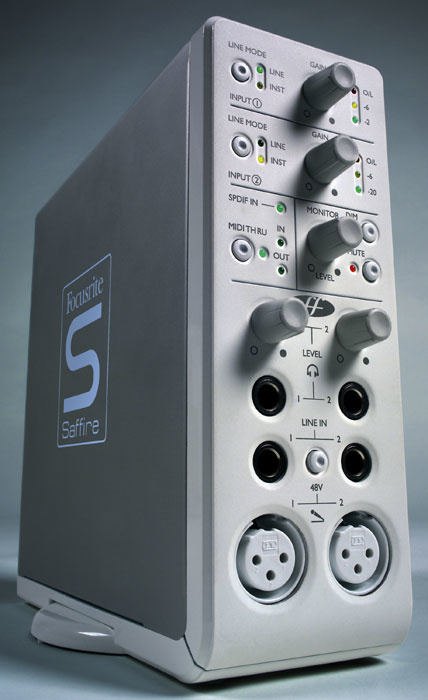
Focusrite Saffire audio interface.Focusrite Saffire audio interface.

SOS Forum Post

PC music specialist Martin Walker replies: When it comes to audio quality, there's a lot more to computer audio interfaces than the choice of A-D/D-A converters — having a low-jitter clock is vital if the sound is to remain 'focused', and the design of the analogue support circuitry (the input preamps and output stages) also modifies the final sound to a lesser extent, including the choice of op-amps, some of the capacitors, the power-regulator design... the list goes on!

Many manufacturers start the design of a new audio interface by establishing a rough feature list along with a likely price point, and then the engineers have a complex juggling act to perform to meet this brief. Entering the equation are the quality and price of the converters, the quality of the analogue circuitry (particularly the mic preamps, if there are any), the quality of digital circuitry, plus the controls, connectors, casework and so on. However, when it comes to the converters, many companies tend to choose exactly the same components from one of a handful of manufacturers like AKM Semiconductor, Cirrus Logic and Burr Brown.

The converters may only end up contributing a tiny part of the overall build cost, but their specifications often become an important part of the marketing process, particularly when new features like 192kHz support are available (though in the real world I still regard this as a red herring for most recording musicians). Some audio interface manufacturers also quote specifications for the converter chip alone, which can be misleading, since once all the support circuitry is added this inevitably compromises overall performance to some extent. Others quote real-world performance for the entire interface, which is far more helpful.
The Focusrite Saffire and the MOTU Traveler are both 24-bit/192kHz Firewire interfaces, so why does one cost twice as much as the other?The Focusrite Saffire and the MOTU Traveler are both 24-bit/192kHz Firewire interfaces, so why does one cost twice as much as the other?

With many audio interfaces you are predominantly paying for the array of features on offer, so an eight-in/eight-out interface will cost a lot more than a stereo one simply because there's nearly four times as much circuitry, socketry and controls. You will also pay more for additional features such as mic preamps, built-in limiting, word clock I/O and so on, which is why I always stress the importance of choosing the interface that best suits your needs. A £1000 interface with loads of features may not benefit you if you really only need one with basic stereo in/out capability that could give you similar audio quality for half the price or less. On the other hand, if two interfaces with similar features and I/O are at wildly different prices, the more expensive one is almost bound to offer better audio quality, although whether or not you'll really benefit from it depends to some extent on the rest of your gear. 


Published December 2005

Wednesday, January 1, 2020

Q. Can I connect an AES output to an S/PDIF input?

Liquid Channel offers AES digital in/out on XLRs.Liquid Channel offers AES digital in/out on XLRs.
I own a Focusrite Liquid Channel (which is great!) and would like to connect it to my MOTU 828's digital input. However, on the digital side of things the Liquid Channel only has an AES-EBU input and output, and the MOTU 828 only has S/PDIF and ADAT digital connections. How can I connect them together?

Bernhard Wagner

Technical Editor Hugh Robjohns replies: The proper way to connect AES to S/PDIF is to use a dedicated digital format converter, of which there are plenty around (although some older designs only pass 16 bits rather than the full 24, so check before buying). The M Audio CO3 and the Behringer Ultramatch and Ultramatch Pro probably represent the most affordable options.

However, although it is a rather makeshift solution (a 'bodge', to use the technical term), if you only need the signal to travel a fairly short distance — say, no more than two metres — you can get an AES output to feed an S/PDIF input with just a simple XLR-to-phono cable. Wire pin 2 of the XLR to the tip of the RCA phono jack, and pin 3 of the XLR to the sleeve of the phono. Pin 1 of the XLR should remain wired to the cable screen at the XLR end, but leave it disconnected and insulated at the phono end.
Strictly speaking, the Channel Status and other subcode data is formatted differently between AES and S/PDIF, but very little equipment bothers to send or read the full subcode data set anyway, so it is rarely a problem.


Published November 2005