Welcome to No Limit Sound Productions

Company Founded
2005
Overview

Our services include Sound Engineering, Audio Post-Production, System Upgrades and Equipment Consulting.
Mission
Our mission is to provide excellent quality and service to our customers. We do customized service.

Wednesday, March 18, 2015

Q Do laptops sound worse when using an AC adapter?

Hugh Robjohns


A mastering engineer told me that, when playing back source files from his laptop into a high-quality USB-connected D-A, the masters sounded ‘worse’ if the laptop was plugged into its power supply, as opposed to running off the battery. He sent me ‘with and without’ comparisons and there was indeed quite a difference. He then went on to test the source files running from various USB, Firewire and internal hard drives, and maintains that internal drives for record or playback in real time (ie. not a data transfer) sound better than either USB or Firewire. What could be going on here?


SOS forum post
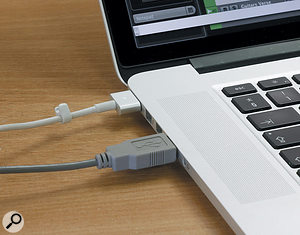
Running your laptop from its AC power supply can sometimes complete a  ground loop — and in some cases that can be very bad news for the performance of a USB D-A converter.

SOS Technical Editor Hugh Robjohns replies: I’ve heard many similar claims — in particular that USB thumb drives sound better than external hard-disk drives — and have experienced the same thing myself on occasion. I suspect the answer lies in our old nemesis, the humble ground loop.


Ground loops are formed when multiple devices are interconnected in such a way that their local ground references are at slightly different voltages, and a current can therefore flow around a loop from one device’s mains safety ground, through the connecting cables to a second device, through that mains’ safety ground, and back via the building’s mains wiring. This ground current is largely inevitable and quite normal, and it really shouldn’t be a problem if the equipment is designed and grounded correctly. However, in some cases this ground current can find its way into the ground reference point of the electronics, and thus affect the equipment’s operation in some subtle, or sometimes not so subtle, way.


Running your laptop from its AC power supply can sometimes complete a ground loop — and in some cases that can be very bad news for the performance of a USB D-A converter.Running your laptop from its AC power supply can sometimes complete a ground loop — and in some cases that can be very bad news for the performance of a USB D-A converter.In the case of analogue equipment, if this ground current finds its way into an audio amplifier’s ground reference, it effectively gets mixed in directly with the wanted audio signal. Since the ground current is from the mains supply, it usually comprises a 50Hz (here in the UK; in some countries, including the USA, it’s 60Hz) fundamental with some harmonics, and we hear that as the familiar ‘ground-loop hum’.


In digital equipment, ground-loop currents might manifest as audible hums or buzzes, but more often than not they produce far more subtle effects and artifacts instead, because they end up interfering with the digital data in various ways, rather than the analogue signal. Consequently, ground-loop problems tend to alter the performance of D-A (and A-D) converters quite subtly — perhaps by modulating their ground references, or by inducing jitter into the clocking circuitry. Ground loops are very unlikely to corrupt pure data transfers between a computer and a hard drive, say, but may well affect any real-time conversion processes between the analogue and digital domains.


In the example you gave, it’s quite possible for a ground loop to be created between a mains-powered converter (and connected mains-powered amps/speakers) and a mains-powered laptop via the grounded RF shield within a USB or Firewire connecting cable. (The same applies to any external mains-powered hard drives too, of course). Disconnecting the mains adapter from the computer and running it on its internal battery obviously breaks that ground loop and removes whatever influence ground-loop currents were having.


As with analogue equipment, good design of internal grounding arrangements will minimise or negate these kinds of ground-loop issues and, again, as with analogue equipment, not every manufacturer has mastered this critical aspect of design. So some equipment might exhibit subtle problems, and some might not. With any ground-loop problems, the first step is to minimise the chances of a ground loop generating troublesome current flows by making sure that all connected equipment is plugged into adjacent mains power sockets (so that the mains safety earths are all at the same potential), not different sockets on different sides of the room!


If some of the equipment can’t be battery powered, the next step is to break the ground path between devices. Unfortunately, the simple and elegant solution for analogue ground loops — the line isolation transformer — isn’t so readily available for high-speed USB and Firewire connections.


USB isolators certainly exist, using either special ‘air-core’ pulse transformers or optocouplers. Sadly, though, most only support USB 1 full-speed operation at 12Mbps, not full high-speed USB 2 up to 480Mbps. Consequently, they might be fine for curing ground-loop problems with USB keyboards passing MIDI data, but probably aren’t adequate for multichannel audio interfaces.


BB Electronics make a commercial full-speed (12Mbps) USB isolator, and Analogue Devices offers the ADUM3160 and ADUM4160 isolator chips which have been used by Oleg Mazurov in a DIY isolator circuit. This also appears to be offered, ready built, by Olimex Ltd. Again, these are limited to a maximum data rate of 12Mbps.    


Monday, March 16, 2015

Q How do I achieve a reverb-drenched sound on a full mix?

Mike Senior


A lot of the music I’m enjoying seems to be going back to an old-school sound of being swamped in lush reverb. Examples include the recent Ray Lamontagne, Escondido, Damien Jurado and Jesse Woods recordings. For this effect, is it best to put the reverb on the master bus or to leave it to the mastering engineer? Do we assume they have excellent reverbs at hand? And if that’s the effect we’re going for, is it better to leave all of the tracks themselves completely dry? Would a high-pass filter on the reverb still be advised? Matt, via email

If your songs trade on lush reverb, should you be putting a  reverb on the master bus? Probably not...

SOS contributor Mike Senior replies: First things first, reverb is almost always best applied during the mixing process, rather than at the mastering stage, because that way you can selectively target the effect to give your mix a sense of depth. Some parts might have more reverb to push them into the background, for instance, while others might be left drier to keep them subjectively closer to the listener. So, for example, in the first verse of Ray Lamontagne’s ‘Be Here Now’ there’s a lot less reverb on the lead vocal and acoustic guitar than on the piano and strings, hence the latter appear considerably further away from you.


If your songs trade on lush reverb, should you be putting a reverb on the master bus? Probably not...If your songs trade on lush reverb, should you be putting a reverb on the master bus? Probably not...As to whether the reverbs those productions are using are ‘excellent’, that’s a question of definition as much as anything — there’s no absolute quality benchmark when it comes to reverb processing for popular-music mixing, because different reverb types are often used for very different purposes. For example, there are many classic reverb units that are a bit rubbish at simulating convincing acoustic spaces, but which are popular for other reasons — perhaps they flatter the timbre of a certain instrument or enhance its sustain. However, I suspect from your stated references that you’ll get most joy from realistic acoustic emulations and smooth plate-style patches, both of which can be found very affordably these days, and may even be bundled within your software DAW system.


The difficulty with lush reverbs, however, is avoiding mix clutter, and high-pass filtering the reverb returns, as you suggest, is therefore usually advised to tackle this. More in-depth EQ may also be necessary, and the best way to tell if it’s needed is by toggling the reverb return’s mute button while you listen to the overall mix tonality. If the mix suddenly gets a bit ‘honky’ when you switch in the reverb, then that might be an indication that you need a bit of mid-range cut, say. Another trick that I find extremely handy in this kind of context is to precede the reverb with a tempo-sync’ed feedback delay, because this helps lengthen the sustain tail of the reverb without completely washing the mix out, and also keeps instruments from being pulled as far back in the depth perspective by the effect. I’d also recommend not feeding too many different instruments to the same reverb when you’re using long-decay patches, because that makes it easier to filter out elements of a specific instrument’s reverb that you don’t need, without affecting other parts, which can further improve the clarity of your overall mix texture.  


Friday, March 13, 2015

Q Will a Shure SM58 sound better on vocals than a condenser mic in a lively room?

Sound Advice : Miking


I have to record a vocal track in a fairly live–sounding room. I’ve got a couple of reasonable condensers, which I could use with a Reflexion Filter, but I’m considering using a Shure SM58 [cardioid dynamic mic], purely as it might pick up less room ambience. Is the drier sound I’ll get with the SM58 worth the slight loss of detail? And, for that matter, would the SM58 actually sound drier in the first place?


Hugh Robjohns


SOS Forum Post

Can a  dynamic mic like the SM58 really help tame room sounds when recording vocals? The answer may be yes — but probably not for the reason you’d think!

Can a dynamic mic like the SM58 really help tame room sounds when recording vocals? The answer may be yes — but probably not for the reason you’d think!Can a dynamic mic like the SM58 really help tame room sounds when recording vocals? The answer may be yes — but probably not for the reason you’d think!SOS Technical Editor Hugh Robjohns replies: Plenty of big names record with an SM58 to get the right performance, so I wouldn’t worry too much about any potential for ‘loss of detail’. From that point of view, just try it out and see how happy you are with the sound you get. On the matter of avoiding the capture of unwanted room sound, working any mic very close will minimise room sound, simply because you’re increasing the ratio of wanted signal (voice) to unwanted signal (room). And as it’s easier to use an SM58 closer than most capacitor mics, it does seem to make sense. Of course, getting up close and personal with a cardioid mic like this will bring the proximity effect bass boost into play, so I’d advise doing a quick test recording. Like its bigger brother the SM7, the SM58 is actually designed to be flatter at the low end when used up close, with the bass response falling off the further away you get. An alternative would be to try an ElectroVoice RE20 — another dynamic mic that can be used up close, but one which has been acoustically designed to control the proximity effect in that kind of application. All this said, though, personally, I’d much rather tame the room with some well–placed duvets behind and to the sides of the vocalist — which will have a much more beneficial effect than using the Reflexion Filter on its own — and use a capacitor mic, provided it is the best choice for the voice and application in question.  


Saturday, March 7, 2015

Q What makes a vocal part's harmonics louder than the fundamental pitch?

Sound Advice : Mixing


I’m recording a singer whose pitch is pretty good, but on higher notes the sound gets a little harsh. Looking at the waveform on an spectrum analyser, I see that the harmonics (first octave up, etc.) have as much amplitude as the main note. I am EQ’ing a bit to make it sound less harsh, successfully to some degree, but I was just wondering whether it’s unusual for harmonics in the sung word to be as loud or even louder than the actual note?


Mike Senior


Tim Jacobs, via email

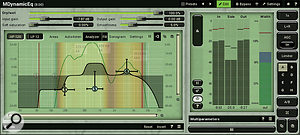
A dynamic equaliser such as Melda’s MDynamicEQ is one of the best tools for dealing with the harsh–sounding single–frequency resonances generated by some singers.

A dynamic equaliser such as Melda’s MDynamicEQ is one of the best tools for dealing with the harsh–sounding single–frequency resonances generated by some singers.A dynamic equaliser such as Melda’s MDynamicEQ is one of the best tools for dealing with the harsh–sounding single–frequency resonances generated by some singers.SOS Contributor Mike Senior replies: Not at all. The main reason is that vowel sounds are generated by creating quite powerful resonances in the throat, nose and mouth, and a harmonic can easily overpower a pitched note’s fundamental under such circumstances. In my experience, this also tends to happen more often when the singer is straining for higher pitches or simply just singing very loud, as both these situations can favour harmonics over fundamental in the timbral structure of the note. The situation isn’t helped by the practice of close–miking, which will tend to unnaturally highlight mouth resonances that wouldn’t be nearly as obtrusive when mixed more evenly with resonances from chest and sinuses in normal listening situations. Operatic singers can be particularly problematic too, because of the way they deliberately exaggerate their vocal resonances for the purposes of projection in order to compete on even terms with backing instruments in typical performance situations.


From a mixing perspective, this can be a tremendously fiddly thing to try to remedy with processing, because effectively you’re chasing a moving target. On some notes, the unwanted resonance is there, but on others it isn’t, depending on the interaction between the pitch, volume, and vowel–sound being used. That means you can’t use simple EQ to scotch the resonance without it wrecking non–resonant notes. I usually do one of two things: either I automate narrow EQ cuts to rein in those over–strong harmonics just on the harsh–sounding notes, or I program a dynamic EQ plug–in to do the same thing. (I rather like Melda’s MDynamicEQ for this.) Fortunately, there are usually only two or three troublesome harmonics in any one vocal recording, and they’re usually all in the 1kHz–4kHz range, which limits the laboriousness of the endeavour to a degree.


While we’re on the subject, this issue is by no means restricted to vocals. Many instruments simply aren’t large enough to project much level at the fundamental frequencies of their lowest notes, so they’ll naturally give you a harmonics–heavy balance, and that’s not usually a mixing problem — although you can also get sporadically overbearing harmonics with instruments too, especially things like drums, acoustic guitars, and wah–wah electric guitars.